
A FigJam alternative that isn’t a Figma file
No Figma account and no workspace above it. Local-first, keeps working offline, finds any reference by its colour, and exports your whole workspace as a file you keep.
The best FigJam alternative without a Figma account is Gladeboard: a moodboard canvas that works offline, finds any image by its colour, and is three boards free. If your team already lives in Figma, FigJam is still the right room for workshops; on Apple devices only, Freeform is free and works offline.
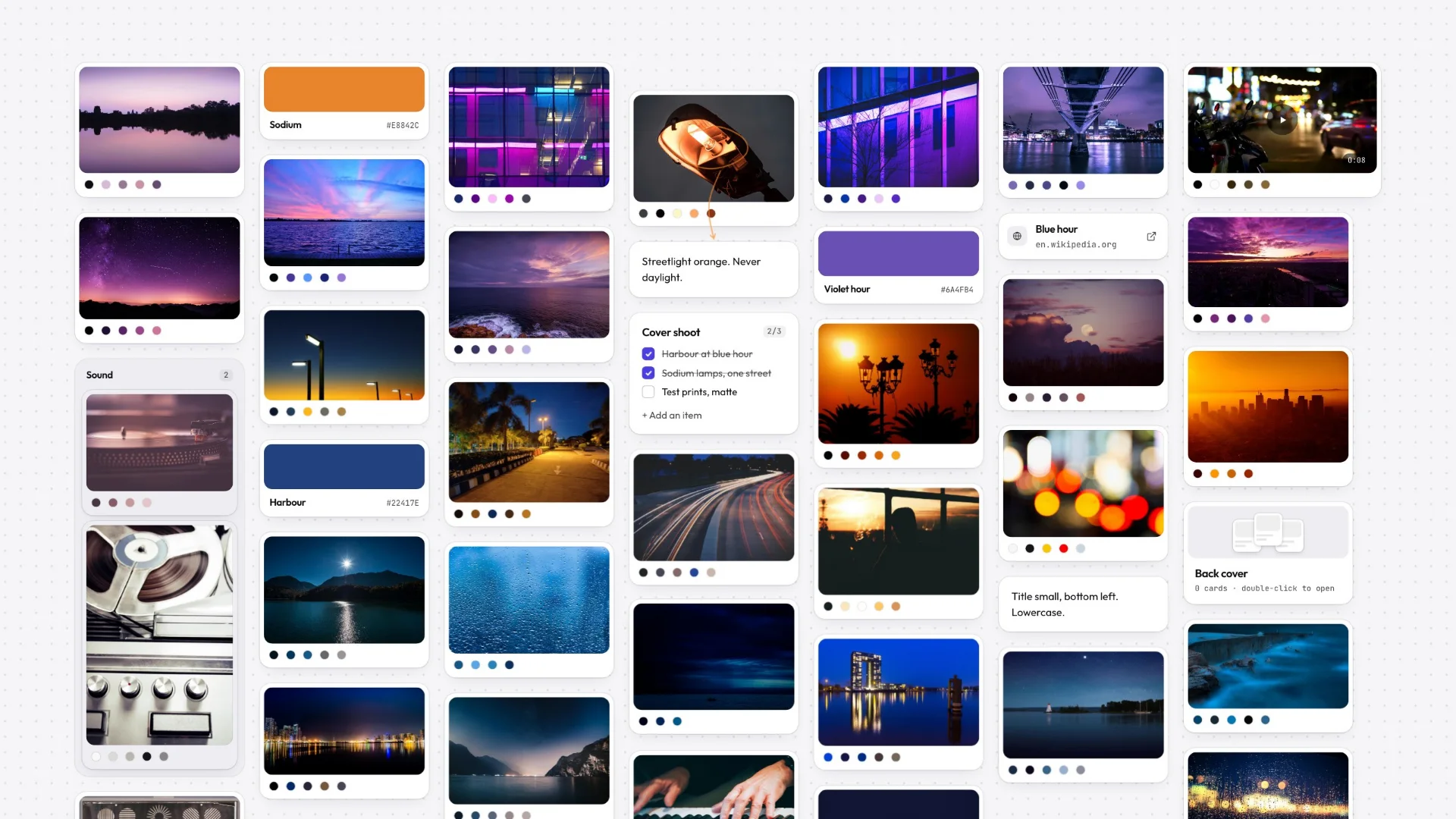
| Tool | Best for | Works offline | Free plan | Runs on |
|---|---|---|---|---|
| Gladeboard | Moodboards and reference, no Figma account | Yes: create, edit and search | Three boards, no card limit | Any modern browser |
| FigJam | Teams already working in Figma | No, cloud-first | Limited free plan | Web and desktop apps |
| Miro | Live workshops with a team | No, cloud-first | Limited free plan | Web, desktop and mobile apps |
| Apple Freeform | Anyone entirely on Apple devices | Yes | Free, built in | Mac, iPhone, iPad |
| Milanote | Visual planning with templates and sharing | No, cloud-first | Counts notes, images and links in total | Web, desktop and mobile apps |
FigJam is a good whiteboard, and if you already have a Figma seat it is the obvious one to use. The reason people look for an alternative is rarely the board itself — it is that the board is a Figma file, in a Figma account, inside a workspace somebody else administers.
Gladeboard is the version of that surface with nothing above it. Local-first, so it opens instantly and keeps working with no connection. Built around images rather than sticky notes, so it can find any reference by its colour. And the whole workspace exports as a plain file you keep.
- 3
- $8
- 1
If you already have Figma, you already have FigJam
Worth getting out of the way. FigJam is Figma’s whiteboard and it sits in the same account, the same file browser and the same sharing model. If your team is on Figma and your boards are part of design work that lives there anyway, the sensible move is to use it. Nothing on this page is an argument against that.
The people who come looking for an alternative are usually in one of two situations: they do not have a Figma seat and do not want the account just for a whiteboard, or the board is personal and they would rather it were not inside the file tree their employer administers.
A board in a design file, or a board of your own
A FigJam board is a Figma file. That is genuinely useful when the board is a step in a design process — the sticky notes and the screens they became sit next to each other, and handoff is just a link. It is less useful when the board is a personal reference library, because then your moodboard is an asset in someone’s workspace, subject to their seats, their permissions and their retention.
Gladeboard keeps the board on your device, and the whole workspace exports as one plain file you can put anywhere. There is no workspace above it, nothing to administer, and no seat to lose when you change jobs. That is a smaller product with a simpler promise: this is yours.
What happens with no connection
FigJam is built around Figma’s cloud — the board lives there and collaboration is the reason it does. Real-time multiplayer is very hard to do any other way, so this is a coherent design rather than an oversight, but it means the board and the network are the same dependency.
Gladeboard is local-first and does not have multiplayer, which is exactly the trade that buys it offline. The real copy of the board is on your device, so creating, editing, dragging and searching all work with the connection off. Sync carries changes to your other devices afterwards; it is not what makes the app open.
Sticky notes are not references
FigJam’s centre of gravity is the workshop: stickies, voting, cursors, a facilitator moving things into columns. Images are supported and they are not the point.
Gladeboard is built the other way round. Images are the point — every one you add has its palette read on the spot, so you can ask the board for “everything teal” and get it, which is how people actually remember a reference they collected six months ago. Alongside them the canvas takes notes, to-dos, links with previews, colour swatches, headings, columns and nested boards. Paste a YouTube, Vimeo or Loom URL and it plays in place; paste a CodePen or a gist and it renders with syntax highlighting.
Trying it without another account
Given the whole objection is usually “I don’t want another account for this”, it would be odd to demand one. The demo opens the real canvas with no signup and nothing to install — the same cards, the same colour search, a board you can actually drag things onto.
If you make something you want to keep, signing up afterwards brings it with you. Three boards are free forever with sync included and no card cap; $8 a month lifts the board limit, and there is no per-seat pricing because there are no seats.
Great tools. Different priorities.
Milanote and Miro are mature cloud products. Gladeboard starts somewhere else: your work belongs on your machine.
Described either of them unfairly? Tell us and we will fix it.
- Keeps working offline, boards held on your device
- Find a reference by its color
- Your whole workspace as one file you keep
- Try the real canvas without an account
- Free plan
Frequently asked
Is there a FigJam alternative that does not need a Figma account?
Gladeboard needs no Figma account, and the demo board needs no account at all. Sign up only if you want your boards synced across devices, which is free.
Does Gladeboard work offline like FigJam does not?
The real copy of the board is on your device, so creating, editing and searching all work with no connection. FigJam is built around Figma’s cloud, which is what makes its real-time collaboration possible.
Can Gladeboard replace FigJam for team workshops?
No. There is no real-time multiplayer, no cursors and no voting. Gladeboard is for the visual thinking one person does before and after a workshop, not for running the workshop itself.
Where do my boards live?
On your device, and in your account if you sign in so they follow you to any browser. The whole workspace exports as one plain file — your boards are not assets inside a workspace someone else administers.
Is Gladeboard free?
Three boards, synced across your devices, free forever, with no card cap, no watermark and no trial clock. Cloud lifts the board limit at $8 a month.